thanks for stopping by!
SOFTWARE REDESIGN
Visualizing an intelligent autofill feature to accelerate cataloging processes
Transform clunky school library inventory management into a seamless and quick process utilizing advance AI technology.
Ideating: Our initial sketches
Our sketches aimed to find the most optimal way to reduce the tedious process of copying-and-pasting into a more straightforward and streamlined procedure. We decided to utilize a pop-up page where users could upload a file of their screenshot. We also experimented with different methods to visualize the CTAs and other ways to make the task more convenient, such as adding a split-screen to view the screenshot as librarians input or check the publication information.
Project Overview
This is a redesign project I developed in a team of 4 UI/UX designers to enhance the cataloging workflow within Follett Destiny Library Manager for high school librarians. Follett Destiny Library Manager is a web-based, K-12 library management system designed for schools and districts to track print and digital resources, manage circulation, and conduct inventory.
The goal of this project was to identify and prototype a redesign potential for Follett to address critical usability issues or opportunities to streamline their current processes.
UI/UX designer
4 UI/UX designers
Figma, Google Workspace
10 weeks
April - June 2026
MY ROLE
TEAM
TIMELINE
TOOLS



PROBLEM STATEMENT
High school librarians need a more efficient system for processing books that do not already have readily available publication information in order to reduce delays in updating their database.

According to the American Library Association, over 21 state-level studies confirm that school librarians and libraries play a critical role in supporting students’ academic success, literacy, and the development of 21st-century skills. On top of supporting students’ academic development, school librarians also conduct essential administrative and managerial tasks to maintain library operations and databases.
School libraries remain one of the most influential pillars of student achievement.
?
Intrigued by the underappreciated, yet critical role of school librarians, our team set out to discover more about their daily routines and challenges they face.
We noticed a common pattern: a heavy reliance on external resources and workarounds to complete their tasks.
We observed this in the cataloging process of new books. If a book is not found in the current database Follett has on their site, the librarians often seek out this information in alternative library catalogs. This process includes switching back and forth from tabs to copy and paste publication information into the right text fields.
Immediately, the challenge became clear to us.
“There are a lot of features [on Follett], but it shouldn’t take a lot of steps to do something [cataloging].”
“We often leave books on the car for very long until someone adds it [to Follett database].”
“When it’s not there– I wait, put them aside, don’t enter them. I can add it– but then I have to add everything myself, and I have to copy and paste from WorldCat but it's a pain.”
-Aimee Allison,
Lake Park High School Librarian
-Maria Gonzalez,
The Preuss School Librarian
-Karen Nance,
The Preuss School Librarian
We reached out to four high school librarians to discuss more about their roles.
Interviews with them revealed that they utilize the software Follett Destiny Library Manager to manage their inventory and online database, from cataloging to creating patron reports. We gained a lot of insight on how librarians use this platform to manage their inventory.
We were guided through the functionalities and tasks on Follett to gain a deeper understanding on how the site works.
This helped us get a more comprehensive perspective of how Follett works as we lacked direct, administrative access to the site.
Then, we hit a roadblock.
The librarians we interviewed faced many minor inconveniences, but we couldn’t hone in on a specific, tangible problem.
So, we revisited one of our school sites and simulated the librarians’ workflow.

Our solution? Integrating an intelligent autofill tool
Our AI-powered autofill solution enables librarians to bypass manual data entry by uploading screenshots directly from alternative library catalogs. Using advanced computer vision and AI, the tool will extract publication metadata and populate the cataloging fields, accelerating workflows while ensuring data accuracy.
From the catalog page, high school librarians can initiate the new book addition process and choose to quickly autofill details by uploading a document screenshot or manually inputting data. Once the AI-extracted information is reviewed and confirmed, the new title is successfully added to the library's database.
The automated data entry accelerates the cataloging process by eliminating manual copy-pasting.
Rebuilding the cataloging process
Let’s examine our key screens and functionality
Accessing autofill feature
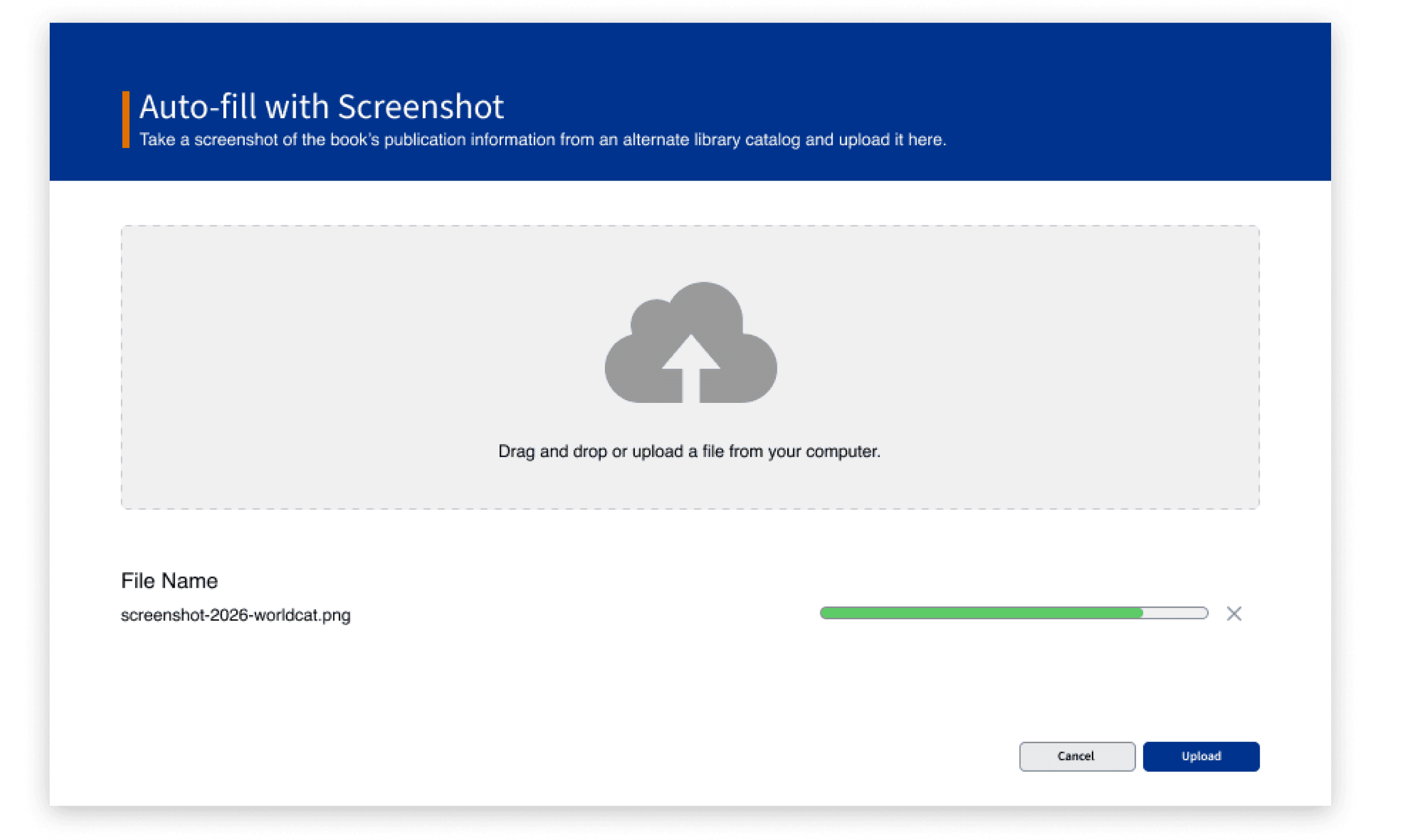
Seamlessly upload from alternative library catalog
Successful completion of task!
#1 Cross-reference screenshot and autofilled information
We visualized two separate mockups of the page showing the input fields to explore different ways we could ensure accuracy and increase confidence in using the tool.
Easily discoverable manual and AI autofill feature on the search page.
Take a screenshot of the new book’s publication information from an alternative library catalog such as Worldcat or Novelist.
A confirmation page to signal to librarians that the title has been added and that they could continue to add a copy!
The page enables a split-screen allowing librarians to view the screenshot as they check and confirm the autofilled information.


#2 Color-coded verification of accuracy
The feature flags certain text fields that warrant extra validation from the librarian to ensure that the extraction of information was accurate.
Testing our initial screens
We tested our high-fidelity prototypes with school librarians, conducting A/B testing with two different versions of both the Search and Autofill screens. These tests helped us iterate and make improvements on our designs for our final screens. Overall, we received positive feedback from our designs, which signaled to us that we were heading towards a good direction!
After synthesizing the feedback we received from our user tests, we iterated on the Search Results and Autofilled Information screens to improve discoverability and provide a more seamless user experience.
Changes made to the Search Results Screen
Changes made to the Autofill Screen
BEFORE
BEFORE
AFTER
AFTER
Iterate, Iterate, Iterate!

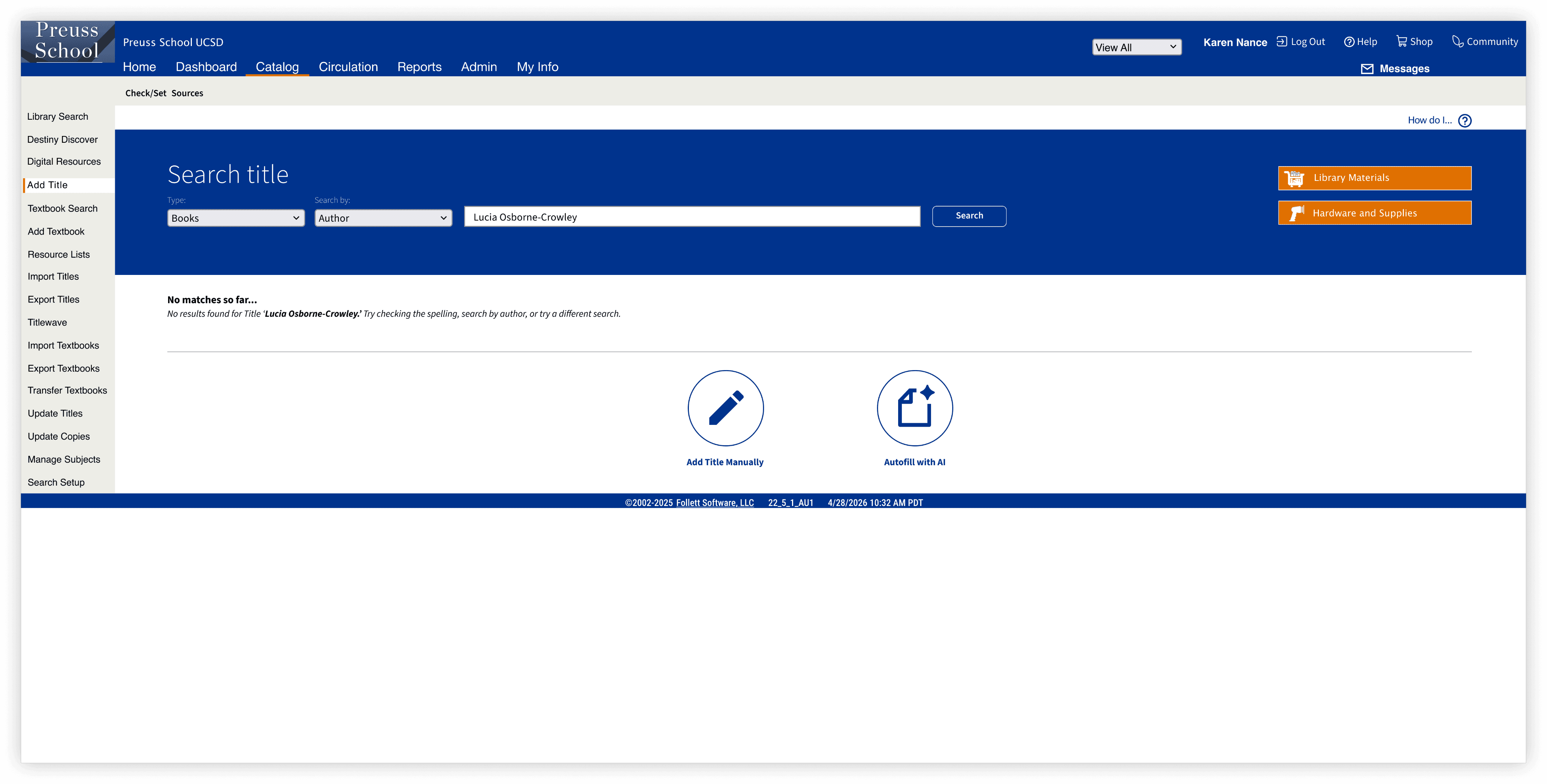
Added “Similar Searches” section that improve discoverability of titles in the database that match closely to desired search.
Larger, more discoverable CTAs allowing librarians to access Manual Add and new Autofill feature when they search for a title that is not in the existing database.
Following our user testing sessions, we redesigned the search pages to improve the experience when no results are found, replacing dead-end searches with actionable guidance. Our participants expressed that they wanted greater reliability in the search functionality and responded positively to larger, more discoverable call-to-actions. Our design introduces a "Similar Searches" feature, larger action buttons for Manual Add and Autofill, and clearer navigation to support continuous cataloging workflows.
We introduced features to improve metadata verification and readability within the cataloging workflow. Participants needed a quicker way to assess data reliability, so we implemented synchronized color highlights across panels to surface fields that require attention. Additionally, a zoom control on the uploaded file panel addresses readability challenges by allowing users to inspect dense metadata more easily.
Removed unnecessary progress bar.
Added scrolling feature to access the rest of the text fields.
Enhanced visual separation for the split screen functionality.
Added the ability to resize and zoom in on the file.


Impact
This extension of Follett transformed the time-consuming, multi-step cataloging workflow into a streamlined experience that users can complete in under a minute. By consolidating key actions, reducing decision points, and improving information hierarchy, the process became significantly faster and easier to navigate. This not only decreased completion time by nearly 80% but also reduced user frustration and increased task confidence, moving books faster off the librarians’ cart!
Here are some of the reactions we had from our librarians:
“I think it would definitely make it more efficient, I wouldn’t have to waste time copying and pasting!”
“...I’d not leave books sitting there and avoid adding the books manually anymore.”
-Karen Nance,
The Preuss School Librarian
Reflection
This project reinforced the importance of designing for efficiency without sacrificing clarity. Working through the existing workflow helped me understand how small friction points can compound into a frustrating experience, even though users might be used to it already. It also challenged me to think critically about how to get to the root cause, and that pivots are absolutely necessary (I’d say unavoidable too!).
If I had more time...
I'd love to validate the redesign through usability testing and measure its impact with real users, expanding our librarian user pool from a lot more schools.. It would also be valuable to explore additional edge cases and user journeys to ensure the experience remains intuitive across different scenarios and user needs.
Special thanks to Karen Nance and Maria Gonzalez from The Preuss School for being amazingly helpful for shaping our project! 📚🫶